Skip to content

Built for shops, cafés, restaurants and hotels

Ring it up once. Your stock, your store and your books keep up.

Billing, stock, an online store, bookings and staff attendance for shops, cafés and restaurants, with one login, every outlet and one set of numbers.

Your business name

Your store address your-business.business-dev.autohisab.com

Create your business free

Live in 2 minutes · Free to start · No credit card required

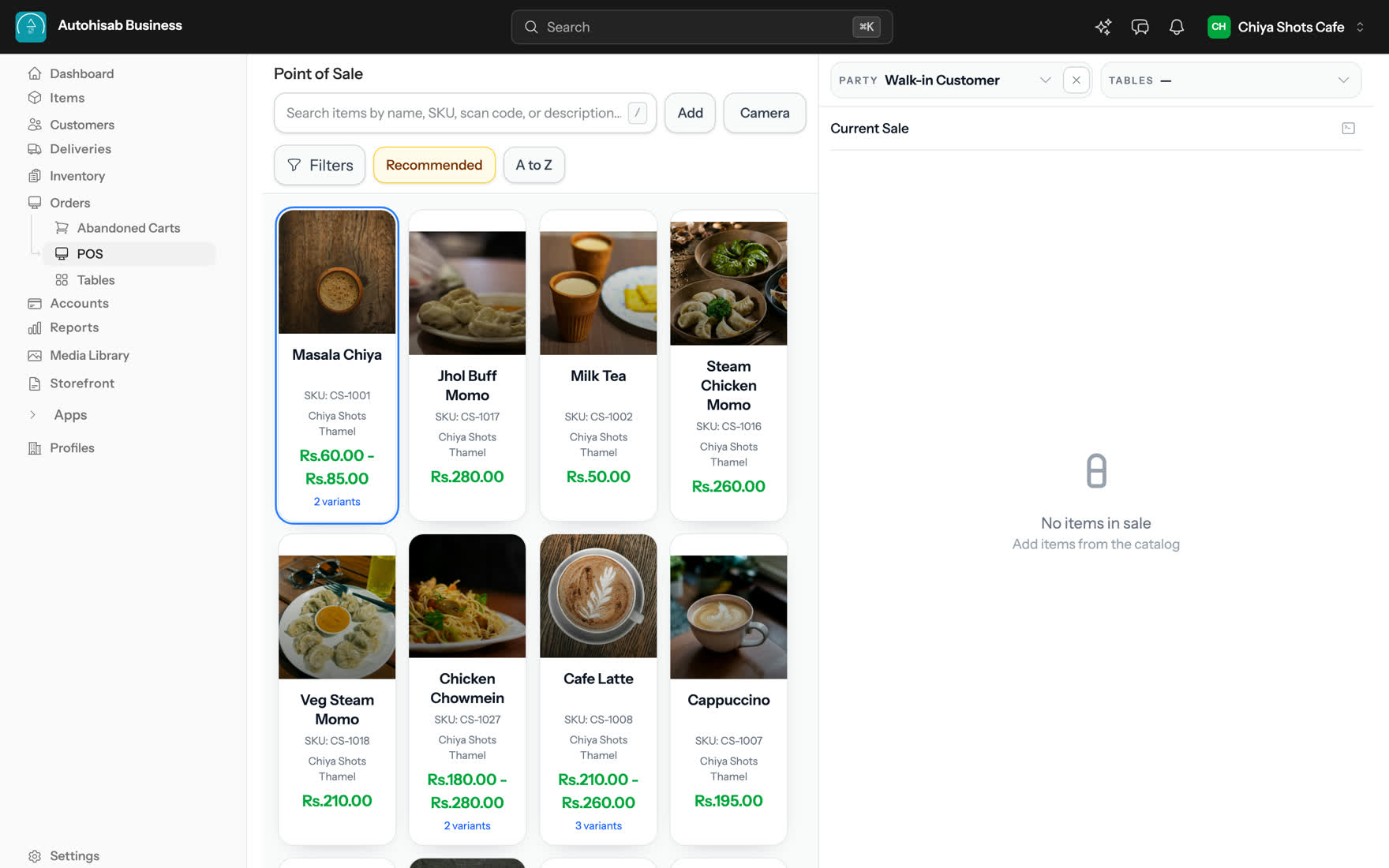
The Point of Sale catalog, each item card carrying its own food photograph: Masala Chiya at Rs 60.00 with 2 variants over a clay cup of spiced tea, Jhol Buff Momo at Rs 280.00 over momo in broth, Milk Tea at Rs 50.00 and Steam Chicken Momo at Rs 260.00, with Veg Steam Momo, Chicken Chowmein, Cafe Latte and Cappuccino on the row below, beside an empty Current Sale panel for a Walk-in Customer.
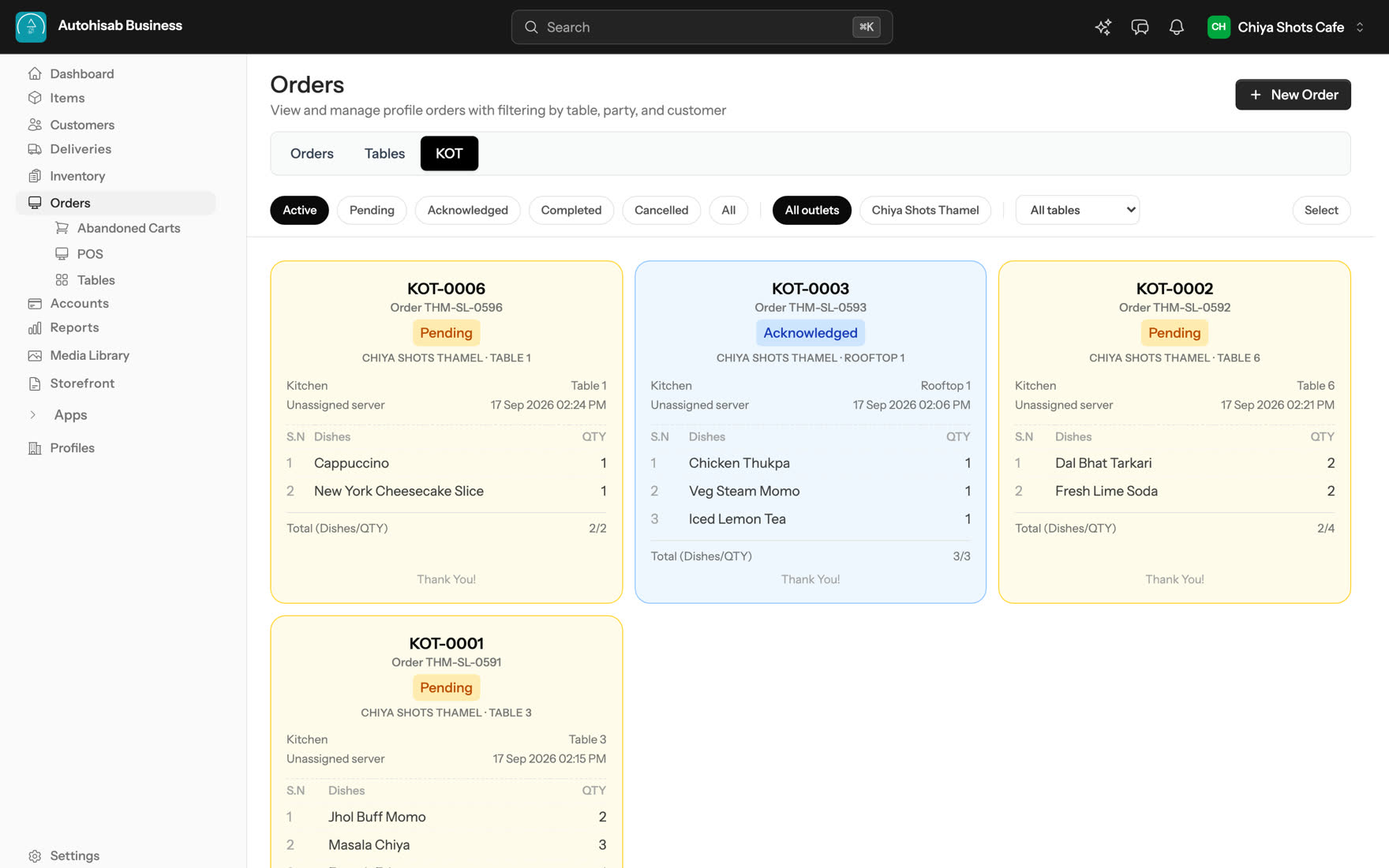
The KOT board on the Orders screen with four tickets: KOT-0006 pending for Table 1 with a Cappuccino and a New York Cheesecake Slice, KOT-0003 acknowledged for Rooftop 1 with Chicken Thukpa, Veg Steam Momo and Iced Lemon Tea, and two more pending for Table 6 and Table 3.
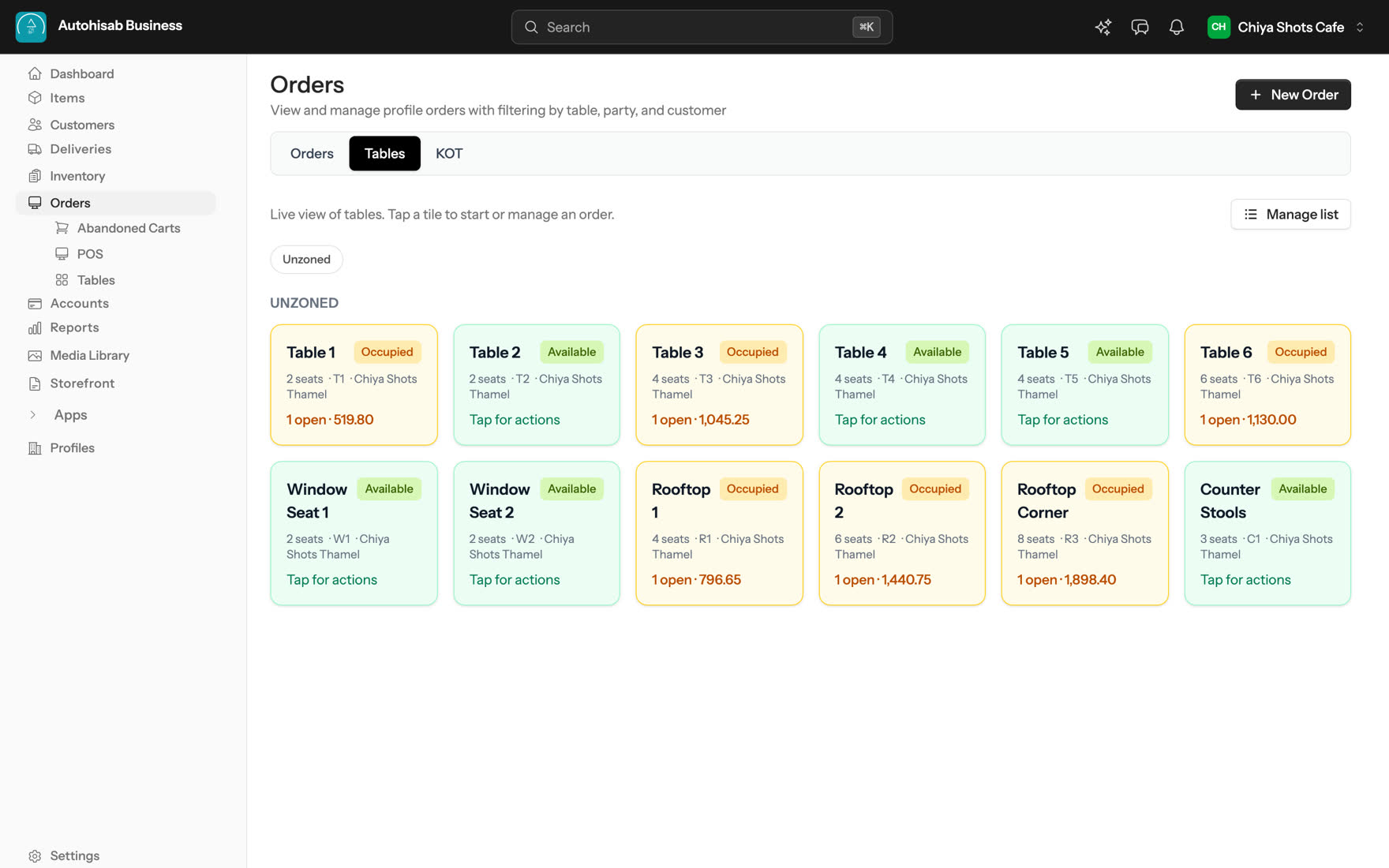
The Tables view: twelve table tiles at Chiya Shots Thamel, with Table 1, Table 3, Table 6, Rooftop 1, Rooftop 2 and Rooftop Corner marked Occupied and showing open amounts from 519.80 to 1,898.40.
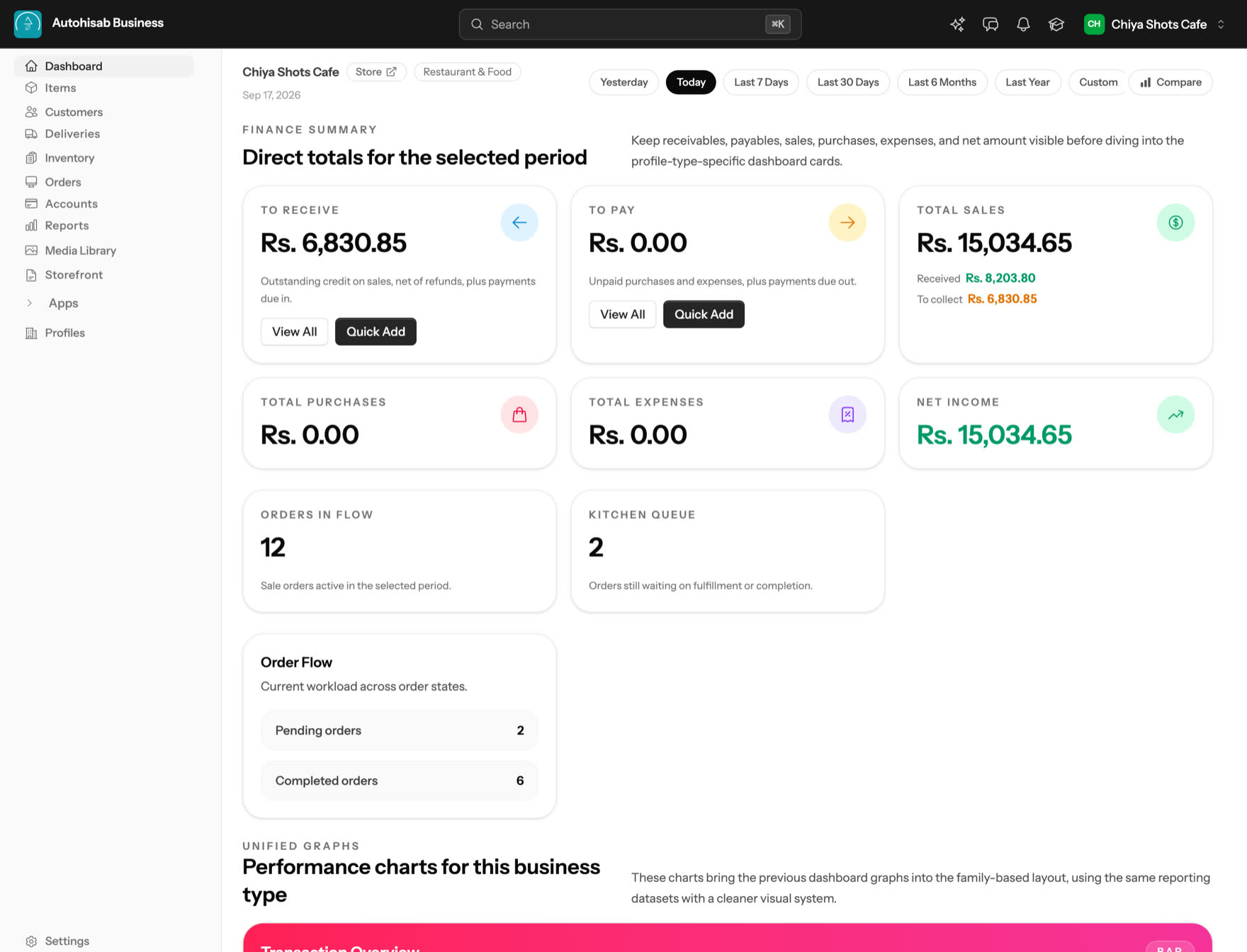
The dashboard for Chiya Shots Cafe showing Total Sales Rs 15,034.65, To Receive Rs 6,830.85, To Pay Rs 0.00, Net Income Rs 15,034.65, 12 orders in flow and a kitchen queue of 2.

By evening, nothing agrees

The day is already running in five places

The till has one number and the notebook has another. The stock sheet was last opened on Saturday. Three orders are sitting in Instagram messages, the website is a separate login nobody checks, and the staff register is a photo on somebody's phone. Reconciling all of that is the second job nobody signed up for.

What changes here

One bill at the counter moves everything downstream at the same moment.

  • Stock falls in the same second, at the outlet that sold it.
  • The Day Book, the party statement and the profit report update themselves.
  • The storefront shows the new quantity to the next visitor.
  • The owner sees it from another city, on the same login.

Sale completed

Rs 1,240

KOT-0006

Cash Printed
  • Stock

    Updated

    Stock falls at the outlet that sold it.

    Arabica Coffee Beans

    −3.2 kg

  • Reports

    Updated

    The Day Book, the party statement and the profit report update themselves.

    Daily Sales

    Rs 15,034.65

    ↑ +12%
  • Online Store

    Updated

    The storefront shows the new quantity to the next visitor.

    Arabica Coffee Beans

    In stock + 12 left

  • Bookings

    Updated

    Today’s reservations and upcoming bookings are all in one place.

    12 Bookings Pending
  • Owner Access

    Updated

    The owner sees it from another city, on the same login.

    Kathmandu Live

Work smarter

Five things you stop doing by hand

Written as what you get, with the screen that gives it to you.

Bill without leaving the screen

Scan items, add variants, notes, coupons and counter sales. Keep part of the bill due later; the receipt shows Paid now and Remaining later. If a price changes, the POS says This cart is out of date and offers Update prices or Keep as is.

Know what is in stock before you sell it

Live stock, variants, purchase orders, Low Stock Items and stock adjustments, held per outlet. Outlet Settlement shows the net position, who owes, who holds, and suggested settlements.

Sell online without a second system

Your own domain with cart, checkout, accounts, wishlist, order history and invoices, plus sitemap, robots, Google sign in and Meta Pixel. Same catalog, same stock, same orders list as the counter.

Close the day with the books already done

Day Book, Party Statement, Receivables, Payables and a Profit & Loss from Merchandise Revenue through COGS, Gross Profit and Operating Expenses to Net Profit. Payment In, Payment Out, expenses, cash and bank accounts, in your own currency.

Give each person only what they need

Multiple businesses on one login, roles per person, per outlet and cross profile reporting. Staff clock in with GPS, a registered device, WiFi or ZKTeco punch, and each shift lands as On Time, Late, Early Leave or Pending Validation.

Instant deployment

Three steps to your first bill

A four step QuickStart walks you through it the first time you sign in. Its own promise is Live in 2 minutes.

  1. Create your business

    Name it, pick the business type, and the dashboard and counter arrive arranged for that type. Nothing to install.

  2. Add your items

    Add or import items, prices, variants and opening stock. Set up tables, rooms, outlets and staff if you use them.

  3. Start billing

    Ring up the first sale, print the receipt or the kitchen ticket, and watch the stock and the Day Book move with it.

Run it by asking

Your AI, now works with your business.

One MCP server. 130 tools. Connect your favourite AI client and let it handle the routine — from orders and payments to stock, content and more.

What it can do

15 things AI & MCP does for you

From sales to SEO, content to stock — get more done with simple prompts.

See all 15 features
  • One MCP server

    130 tools in one URL.

  • Connect in minutes

    Copy setup for your client.

  • Orders by AI

    List, read, update.

  • Typed actions

    Orders, payments, stock.

  • Confirm before writing

    Dry run or confirm.

  • AI page builder

    Draft, preview, publish.

  • Categories by AI

    Create & nest, in batch.

  • SEO by AI

    Fix SEO & alt text.

  • Content by AI

    Blog & module entries.

  • Read your records

    List & query your data.

  • Audit log

    See what agents did.

  • Scoped access

    Only what you allow.

  • AI workspace

    Organise by asking.

  • AI descriptions

    Draft item descriptions.

  • Your own AI key

    Use your AI provider.

Autohisab Studio the page builder

Design any page like Figma. Publish it like a store.

Frames, components with variants, hover and press states, motion and a layout for every device, on the same catalogue, stock and orders that run your business.

Try it yourself

Drag a frame, pick a layer, switch the device, click a button variant, scrub the entrance. The real builder works the same way.

Keyboard shortcuts

  • Layers
  • Components
  • Motion
  • Responsive

Built with a page builder

More than a tillone system

Everything works together.

Each of these is a part of the same product, on the same login, against the same catalog.

A hotel room with the bed made and the lamps lit

A hotel runs here too, not in a second product.

Front desk with Arrivals, Departures and In house. A guest folio you post charges to, void from with a reason, take payment on, settle in one step at checkout and issue a tax invoice from. Night audit closes the day with Occupancy, ADR and RevPAR. Housekeeping carries an inspection sign off, and a Foreign Register covers the guest paperwork where your country asks for it.

  • Arrival
  • Departures
  • In house
  • Folio
  • RevPAR
  • Night audit
  • Occupancy
  • ADR
  • Foreign Register

Outlets that borrow from each other stay square.

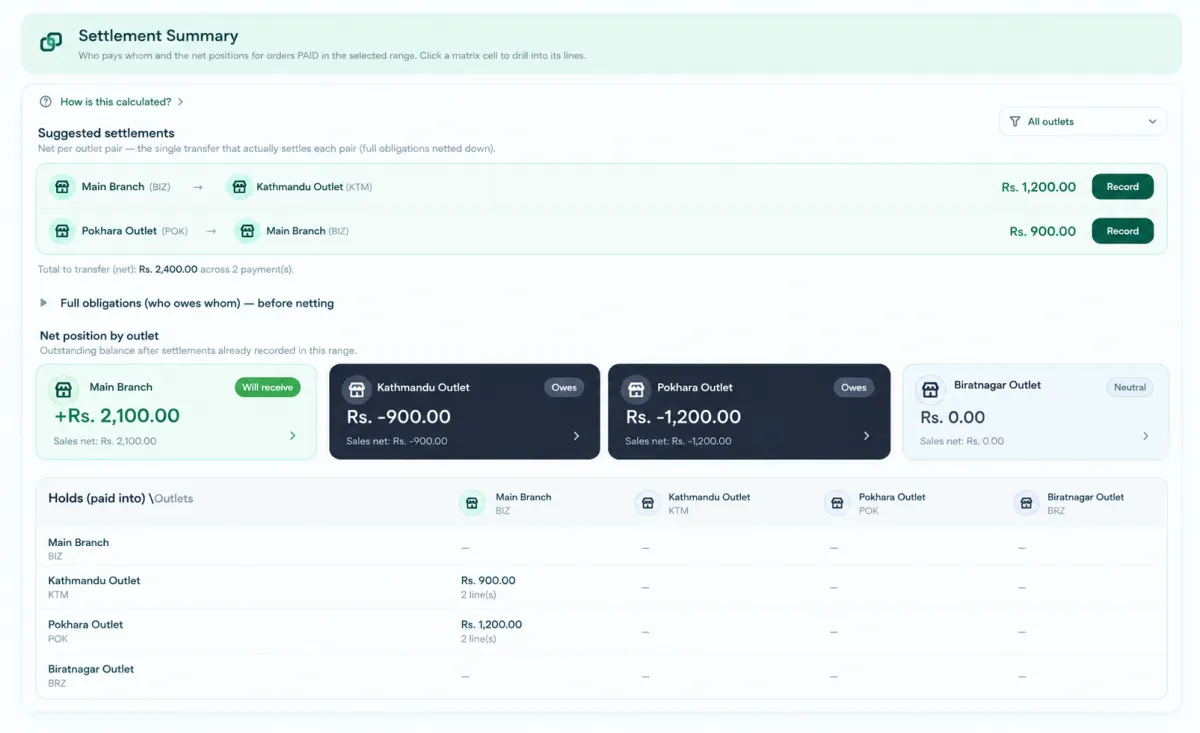
When one outlet sells another outlet's item, Outlet Settlement keeps the net position by outlet, who owes, who holds, and a list of suggested settlements to clear it.

The Settlement Summary screen with suggested settlements and the net position of each outlet

Attendance you can trust.

Clock In validated by GPS, a registered device, WiFi or a ZKTeco biometric punch, then marked On Time, Late, Early Leave or Pending Validation.

One inbox for four channels.

WhatsApp, Messenger, Instagram and Telegram in one thread list. A store assistant can search the catalog, check product availability, apply a discount and create the order inside the customer's own conversation. Customer messages, product details and order activity stay together, so your team can move from a question to a sale without switching between apps.

  • WhatsApp
  • Messenger
  • Telegram
  • Instagram
  • TikTok

One layout. Every paper size.

A block based print designer and an invoice designer cover thermal receipts, kitchen tickets and scan code labels. Pair a bridge device, and a print that fails says so instead of vanishing.

Built where you actually trade.

Couriers hand off through Pathao and PostNord, connecting delivery to the way you already trade. Amounts use your own currency, with support for 21 currencies across sales, invoices and reports. Dates can follow the Nepali BS calendar when your business keeps its books that way, keeping transactions and records familiar to your team.

Pathao PostNord

Apps, with consent you can read.

Browse the marketplace, see the scopes an app asks for before you install it, and build your own as a development app in the partner centre.

Common queries

Questions people ask first

The eight things merchants ask before they sign up, answered plainly. Nothing here is a promise the product does not already keep.

Plans and prices for your country are on the pricing page.

  • Shops, cafés, restaurants and hotels. You choose the business type when you create the business, and the dashboard and the counter arrive arranged for it. A restaurant gets tables and kitchen tickets, a retail shop gets the POS and inventory pairing, a rooms only property gets rooms and no kitchen ticket tab at all.
  • Yes. Several businesses sit on one login, and each business can have several outlets. Items, stock, staff, printers and reports are all held per outlet, and you can report across businesses. When one outlet sells another outlet's item, Outlet Settlement keeps the net position straight.
  • The KOT board carries NEW, ADD-ON, SUPERSEDED and VOID chips, and surfaces Not auto-printed and Print failed rather than letting a ticket disappear. You can Move to table or mark Do not make. On the floor plan you start a new order, transfer to another table, merge into one bill, or release the table.
  • A real store on your own domain, with cart, checkout, customer accounts, wishlist, order history and invoices, plus sitemap, robots, Google sign in and Meta Pixel. It reads the same catalog and the same stock as the counter, and its orders land in the same orders list.
  • It is the same product and the same login. Front desk shows Arrivals, Departures and In house. Each guest has a folio you post charges to, void from with a reason, take payment on and settle at checkout, with a tax invoice at the end. Night audit reports Occupancy, ADR and RevPAR, housekeeping carries an inspection sign off, and the Foreign Register is built in.
  • The page builder is a canvas with Layers, Elements, Pages, Popups and Global, and you design Desktop, Tablet and Phone separately. Start from one of three theme families, Minimal, Clay or Skeuo, and change what you want. Wrap a group in a frame, turn it into a component you reuse, then publish.
  • The server exposes 130 tools, of which 14 are writes: create an order, collect a payment, issue a refund, manage a KOT, adjust stock, record an expense, create a shipment, create a party, create or update an item, and run a sales report. Each write is idempotent, asks for confirmation, and is written to the audit log. You turn it on under Settings, then AI / MCP Connection under Advanced, where you copy the Claude Code, ChatGPT or Codex snippet.
  • A Clock In is validated by GPS, by a registered device, by the WiFi network or by a ZKTeco biometric punch, depending on how you set the rule. Each shift is then marked On Time, Late, Early Leave or Pending Validation, so you review the exceptions rather than the whole register.

Zero Setup Delay

Put the whole day on one login

Set your business up in the morning and run the evening from the same app. Nothing to install, no card to enter, and your catalog, orders and books stay yours to export.

Live in 2 minutes • Free to start • No credit card required

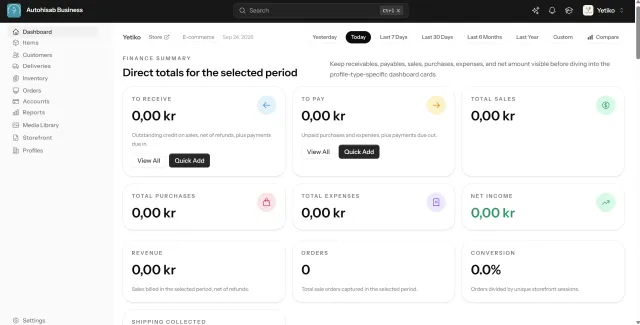
The dashboard open on a laptop, a tablet and a phone, showing the same finance summary