Point of sale that finds the item, splits the bill and feeds the kitchen
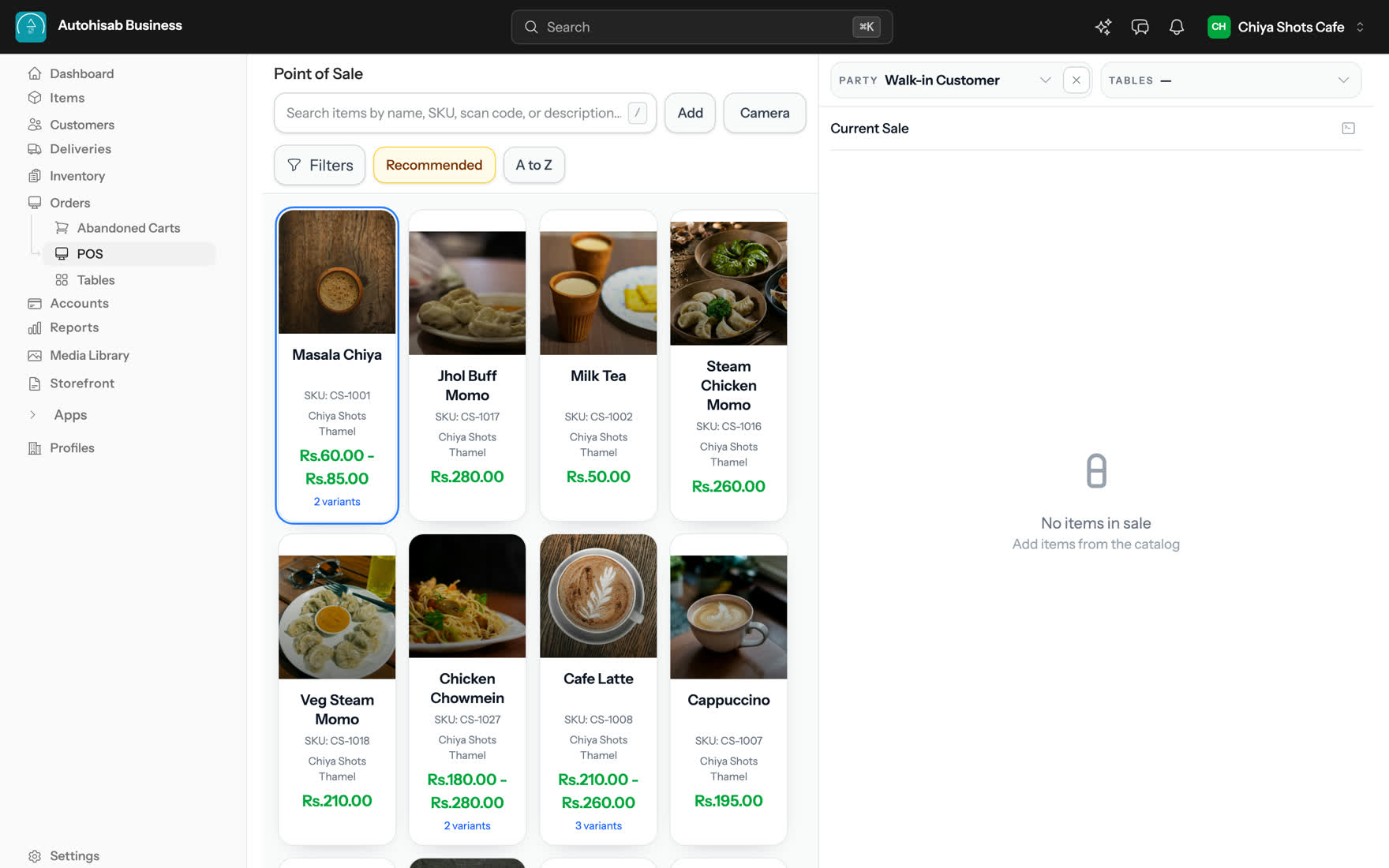
Search or scan an item, take part of the bill now and the rest later, and send each ticket to the station that cooks it.
Nothing to install. Runs in the browser and on Android.
Current sale
Table 4
- Masala chiya × 2 Rs 120
- Jhol momo × 1 Less spicy Rs 280
- Cappuccino × 1 Oat milk Rs 195
- Subtotal
- Rs 595.00
- Discount
- − Rs 45.00
- Tax
- Rs 71.50
- Total incl. taxes
- Rs 621.50
Paid now
Rs 400.00
Remaining later
Rs 221.50
What it does
15 things point of sale does for you
The same circles as the features map, grouped by the part of the day they help with.
Sell & print
- Catalogue search Name, SKU, scan code or description all match the same search box.
- Camera scan Scan a barcode with the device camera instead of typing the code.
- Current Sale Each line carries its quantity, variant and a note for the kitchen or packer.
- Price checks Return to an open cart and changed prices are flagged: Update prices or Keep as is.
- Shared invoices Open the invoice, copy its link or share it via WhatsApp or email.
Money & taxes
- Clear totals Subtotal, Discount, Coupon discount and Tax through to Total incl. taxes.
- Part payment Take part of the bill now; the order stays open with the rest due later.
- Coupons A coupon discount is kept separate from the one you take off by hand.
- Discounts at the till Quick item and bill discounts right at the point of sale, handy for grocery counters.
Kitchen & tables
- Table seating Choose Table, Use table and Release table sit on the sale itself.
- Kitchen tickets Each ticket routes to the station that cooks it and cannot go missing quietly.
- Floor plan Start new order, Transfer to, Merge into and Release table on the plan.
Bookings & hotel
- Service bookings A date, the slots still open on it and how long the service runs.
Outlets
- One login Several businesses and outlets on one login, each person with their own role.
- Your own currency Amounts in the business's own currency, dates in the Nepali BS calendar if you keep books that way.
How it works
Three steps from sign up to your first sale
-
1
Add your items
Type them in or import a list. Each item keeps its price, variants, tax and scan code.
-
2
Open the point of sale
Search or scan to build the sale. In a restaurant, pick the table first.
-
3
Take payment, or part of it
Settle in full or leave the rest on the order, then share the invoice by WhatsApp or email.
- ways to find an item: name, SKU, scan code or description
- 4
- figures on a part paid receipt: paid now and remaining later
- 2
- currency per business, with dates in the Nepali BS calendar if you want them
- 1
- login for every business and outlet you run
- 1
Totals that show their working
The Autohisab Business (dev) point of sale is the screen you bill from: you find an item by searching the catalogue on its name, SKU, scan code or description, or by scanning it with the camera, and it lands in a Current Sale panel where you set quantity, pick a variant, add a note to the line and apply a coupon. The totals run from Subtotal through Discount, Coupon discount and Tax to Net Sale and Total incl. taxes. A customer can pay part of the bill today: the order stays open with the rest due later, and the receipt shows Paid now and Remaining later. In a restaurant the same screen seats a table and sends each kitchen order ticket to the station that cooks it.
- Subtotal
- The lines before anything is taken off
- Discount
- What you took off by hand
- Coupon discount
- Kept apart from the manual discount
- Tax
- Worked out on the discounted amount
- Total incl. taxes
- What the bill comes to
- Paid now
- What the customer settled at the counter
- Remaining later
- What stays on the order against them
-
A point of sale system is the software you ring a sale up on. It holds your item catalogue and prices, builds a bill line by line, applies discounts, coupons and tax, records how the customer paid, and writes the sale into your sales figures and your stock at the same time. In Autohisab Business (dev) the point of sale is one screen inside the same app that holds your inventory, your orders list and your books, so a sale taken at the counter does not have to be typed anywhere a second time.
-
Yes. In a restaurant the point of sale adds Choose Table, Use table and Release table, and a table shows as Occupied while an order on it is still running. Each order sends a kitchen order ticket, and tickets route to the kitchen station that cooks that item. The KOT board marks every ticket NEW, ADD-ON, SUPERSEDED or VOID, and it says Not auto-printed or Print failed rather than losing a ticket quietly. The floor plan handles Start new order, Transfer to, Merge into and Release table.
-
Yes. Enter less than the total when you take payment and the POS shows Part payment, with the rest due later, and the order stays open. The receipt shows Paid now and Remaining later, and the balance stays on the order rather than being written off or keyed in again as a second sale.
-
The point of sale notices and says This cart is out of date, then offers Update prices or Keep as is. Nothing is recalculated behind your back: you choose whether the open cart moves to the new price or is billed at the price it was built with.
-
Yes. After a sale you can open the Invoice, Copy link, Share via WhatsApp or Share via Email. The link is to the invoice itself, so the customer gets the same document you would have printed.
-
Yes. One login can hold several businesses, and a business can have several outlets with its own roles per person. Stock is held per outlet, and when one outlet sells another outlet's item, Outlet Settlement works out who Owes, who Holds and the Suggested settlements. Amounts are shown in the business's own currency, and dates can read in the Nepali BS calendar where a business keeps its books that way.
It all runs off one catalogue
A sale, a stock count and an order are the same record wherever you look at them from.
- Stock held per outlet, low stock and out of stock at a glance, purchase orders that feed Payables, and scan-code labels.
- Build apps for your own business or for the marketplace: a scoped API, embedded screens, storefront blocks, signed webhooks and a review before merchants see them.
- Connect Claude, ChatGPT, Codex or any MCP client to one server, and let it work on orders, stock, the catalogue, content and your pages, with a confirmation before it writes and an audit log after.
-
 All features
Every part of Autohisab Business (dev) on one map.